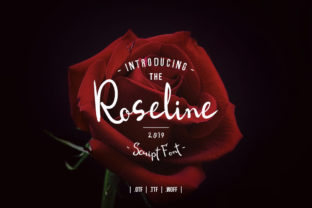
Roseline Script: A Handwritten Font That Feels Like Home
As someone who hand-paints candle labels, designs wedding welcome boards, and cuts vinyl for boutique tote bags, I’ve learned that not every script font earns its place in my design toolkit. Roseline Script does — instantly. It’s not just another handwritten font; it’s a quiet, confident voice on the page — warm, intentional, and unmistakably human. Its organic flow mimics real pen-on-paper movement: subtle pressure variation, gentle tapering strokes, and slight irregularities that make it feel lived-in, not algorithmic.
I reach for Roseline Script when I need elegance without stiffness — like when designing a set of printable planner stickers for a small-batch journal brand, or when laying out a rustic farmhouse sign for a local coffee roaster. It doesn’t shout. It invites. And that makes all the difference when your customer is scrolling through hundreds of Etsy listings and pauses — just for a second — because the “Welcome” on your digital download preview feels like it was written just for them.
Where Roseline Script Shines in Real Craft Projects
Roseline Script thrives where authenticity matters most. On product packaging, it adds tactile warmth to minimalist apothecary labels — think lavender soap bars or small-batch honey jars. Because its letterforms are open and generously spaced, it remains legible even at 14pt on a 2-inch kraft paper tag. I’ve used it for custom sticker sheets sold as digital downloads, and customers consistently comment that the script “doesn’t get lost in the cut” — meaning clean edges on Cricut and Silhouette machines, no jagged terminals or overly thin hairlines that vanish during vinyl weeding.
For wedding stationery, Roseline Script handles names and titles with graceful distinction. The “R” and “L” have soft, looping entries; the lowercase “g” and “y” include charming descenders that add rhythm without clutter. I use it for monogrammed napkin prints, foil-stamped invitation suites (paired with a crisp sans serif for body text), and chalkboard-style welcome signs printed on matte cardstock. It also works beautifully for seasonal collections — think “Gather & Give” holiday mugs or “You’re My Person” friendship bracelets with engraved tags.
It’s not built for paragraphs — and that’s by design. Roseline Script is a display font first: ideal for headlines, short phrases, signatures, and decorative accents. When I’m building a Canva template for printable wall art, I use it for the central quote only, then switch to a neutral sans serif (like Montserrat or Inter) for supporting text. This contrast gives hierarchy, breathes space into the layout, and keeps the focus where it belongs — on the feeling, not the font.
Practical Tips for Getting the Most Out of Roseline Script
Before cutting or printing, always preview Roseline Script at actual size. On small stickers (under 1.5 inches wide), avoid using the swash capitals unless you’re working at 24pt or larger — they’re expressive, but their flourishes can blur or break on fine-detail vinyl. For laser-printed greeting cards, I export PDFs with embedded fonts and run a quick test print on textured cotton paper — Roseline Script holds up well, thanks to its balanced stroke contrast and generous x-height.
The font includes stylistic alternates and ligatures, which I use selectively: swapping in the alternate “&” for gift tags, or enabling the “fi” and “fl” ligatures when setting full names like “Fiona” or “Flora.” These small touches elevate perceived quality — especially important when selling digital templates or SVG bundles where polish equals trust.
File formats matter. Roseline Script comes in OTF and TTF, both fully compatible with Cricut Design Space, Silhouette Studio, Adobe Illustrator, and Canva (via upload). No webfont files are included — and that’s fine, since this is a physical product and printable-first typeface. If you’re making SVG files for crafters to cut, embed the font outlines before exporting to ensure consistent rendering across devices.
Smart Pairings and Brand Consistency
Roseline Script pairs effortlessly with clean, modern sans serifs — think Poppins, Lato, or Work Sans for labels and product descriptions. Their geometric neutrality lets Roseline breathe while anchoring the design in clarity. For a more vintage-leaning boutique identity, try pairing it with a low-contrast serif like Playfair Display or Cormorant Garamond — just keep body text sizes generous and line spacing open to avoid visual competition.
Consistency is where Roseline Script becomes part of your brand voice. I use it exclusively for shop name headers across my Etsy banner, Instagram highlights, and printable packaging inserts. Customers begin to associate that fluid “R” and relaxed baseline with my handmade ceramics line — not because it’s flashy, but because it’s reliably, quietly *me*.
Licensing You Can Trust — For Makers, Not Just Designers
This is critical: Roseline Script includes an extended commercial license. That means you can use it to create and sell physical products (candles, mugs, t-shirts), digital downloads (PDF planners, Canva templates), SVG cut files, client work, and even merchandise for third-party brands — no extra fees, no attribution required. Just keep a copy of your license receipt on file. It’s the kind of straightforward, maker-friendly licensing that saves time and eliminates guesswork when scaling your shop.
Roseline Script isn’t about trend-chasing. It’s about showing up with sincerity — in your product labels, your wedding suite, your holiday collection, your everyday digital printables. It’s the handwritten font that doesn’t try too hard, but still makes people pause, smile, and remember your name. And in a crowded marketplace? That’s not just typography. That’s connection.